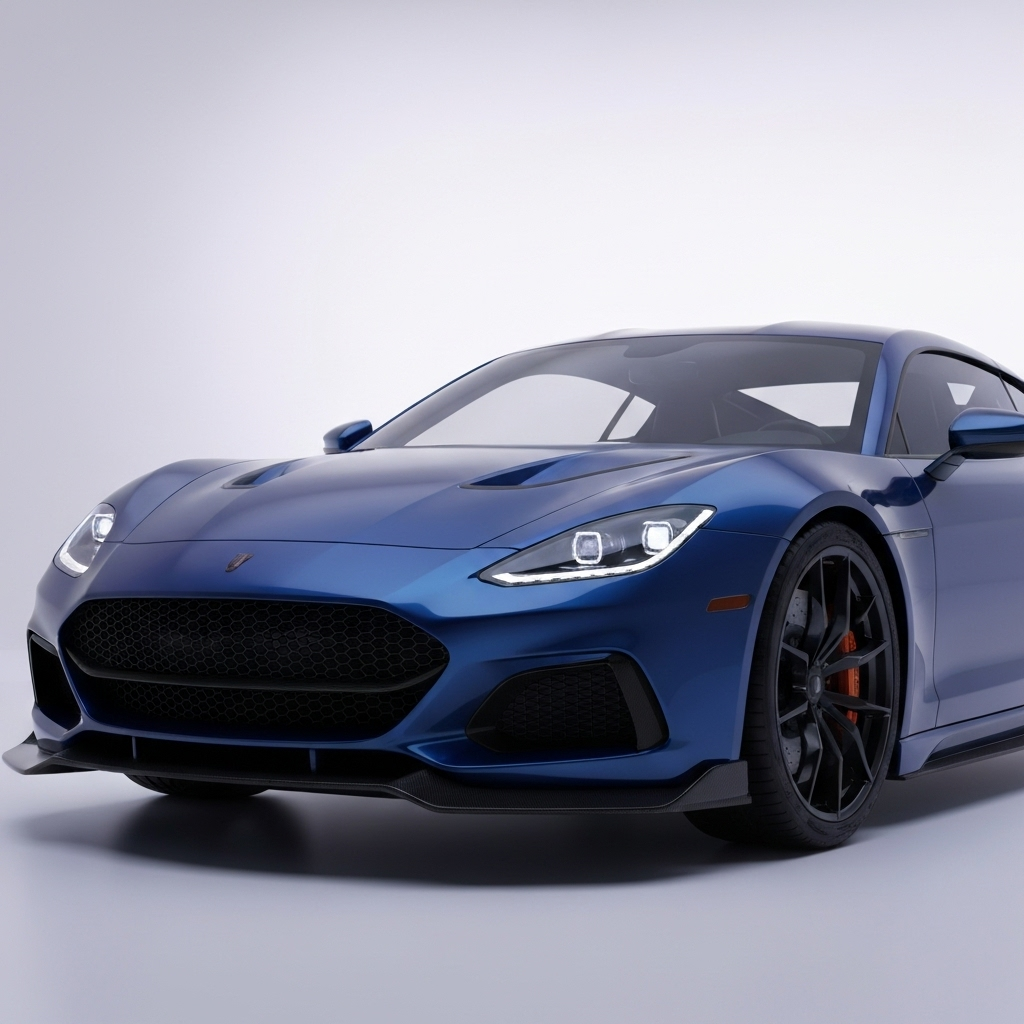
Key Highlights
Here is a quick overview of what you will learn about making great automotive renders:
-
Unreal Engine 5 is a strong tool that is changing how we do automotive rendering. It helps you get lifelike results more easily than before.
-
Physically Based Rendering (PBR) is very important for making photorealistic textures. It works by copying how light hits car materials in the real world.
-
Knowing how to make car materials is key. Learning to create real-looking paint, chrome, and glass will make your car models look amazing and professional.
-
Using the right tools matters. Programs like Blender and Autodesk Maya are great for making detailed car models, while Unreal Engine 5 helps bring them to life.
-
Lighting and surface details are very important. Using good lighting methods, like HDRI maps and global illumination, helps show off your textures and reflections.
-
Beginners can start easily. You can begin making impressive automotive rendering with starter packs and step-by-step guides right away.
Introduction
Have you ever watched a video game or ad and thought a car looked very real? The secret is often the hyper-realistic car textures. A strong tool called Unreal Engine 5 is helping make this quality easier to reach. Making real-looking car images used to take a lot of time and effort. But new advancements in technology have given artists, designers, and marketers more options. This guide will show you all you need to know about making amazing realistic car visuals. We will cover important tools, main ideas, and step-by-step methods to help you turn your 3D car models into lifelike art using the power of Unreal Engine 5.
Understanding Hyper-Realistic Automotive Textures in Unreal Engine 5
So, what are hyper-realistic automotive textures? Imagine a new car in a showroom. You see the shiny paint, clear reflections on the glass, and the bright shine of the chrome parts. Hyper-realism in Unreal Engine 5 is about copying these small details with great care. It means setting the material properties for every part of your car models. This includes the rubber tires and the leather seats.
This high level of realism comes from a method called Physically Based Rendering, or PBR. PBR materials react to light just like they do in the real world. Instead of just faking reflections, you create materials that have accurate properties like roughness and reflectivity. This way, your automotive rendering looks real in any light. This is a big step for making true-to-life images.
The Role of Texture Realism in Automotive Visualization
Texture realism is the key to great automotive visualization. When you look at a car render that really impresses you, it is the small material details that make it feel real. The way light moves over a car’s curved body, the soft orange-peel texture in the paint’s clear coat, and the clear reflections in the windows all help create a believable final image. Without attention to these textures, even the best 3D model can seem flat and fake, like a plastic toy.
Knowing how to work with car materials is very important for making amazing 4K renders. These high-res images show every surface detail, so each one must be perfect. For marketers, this kind of realism helps build an emotional link. It lets potential buyers see and almost feel the car before they go to a showroom. This raises marketing strategies by showing the product in the best way.
In the end, good textures change a simple 3D model into a strong visual asset. The visual appeal of a well-made car render can decide the success of an ad or design presentation. Focusing on realistic car materials and surface details makes sure your work is not only seen but also remembered.
How Unreal Engine 5 Is Transforming Car Rendering Quality
Unreal Engine 5 has made big improvements in real-time rendering. It has changed the way you can expect your car render to look. One key feature is Lumen. This is a fully dynamic system for global illumination and reflections. What does this mean for you? It means light moves around your scene in a true-to-life way. This creates soft, realistic shadows and clear reflections without needing hard setups or long wait times.
Getting high-quality reflections on car surfaces in your 4K renders is now much easier with these tools. Lumen handles how light bounces off different materials. Whether it is the sharp, mirror-like shine of chrome or the soft, blurry reflections on car paint, it works well. You can put your car model in any setting. The reflections will change in real time and look natural and part of the scene.
These advancements in realism are changing what is possible in car visualization. The engine can work with very complex scenes and high-resolution textures. This means you do not have to lower the quality. This power lets you focus on the creative side of your car render. You can trust Unreal Engine 5 to do the hard work and give you a photorealistic final image.
Essential Tools and Software for Automotive Texturing
Unreal Engine 5 is very powerful for rendering. But to create amazing car designs from scratch, you need the right tools. You usually start your workflow in a 3D modeling program. This is where you build the shape of the car. After that, you move on to texturing and rendering. Using the right software at each step helps make your project smoother and more successful.
So, what software should you use to master car materials in 4K automotive renders this year? The choice depends on what you need, your budget, and your experience. There are great free options that work well for beginners and pros. There is also paid software used in the industry that has special features. Let’s look at some of the best software for modeling and material packs. These will help you take your automotive texturing to the next level.
Choosing the Right 3D Modeling and Rendering Tools
The journey to a great car render starts with a good 3D model. The software you pick for making this model will set the base for your whole project. There are many good options, each with its own benefits. The main difference between free and paid software is often the extra features, support, and how well it works with other tools.
For example, paid software like Autodesk Alias is a top pick in the automotive industry. It is known for its precise surface modeling tools. Free software, like open-source programs, gives you great value and a large community for help. Here are some popular tools for making car models:
-
Blender: A free and powerful all-in-one tool. It is great for modeling, animation, and rendering. It also has many free plugins to improve your workflow.
-
Autodesk Maya: A standard tool in the 3D animation and modeling world. It has strong features and works well with other Autodesk products.
-
Cinema 4D: Known for its easy-to-use interface and strong MoGraph toolkit. It is loved for motion graphics and complex animations.
When your model is done, rendering can take a lot of computer power. If your computer struggles with complex scenes, you can use a service like Fox Renderfarm. This cloud rendering service lets you send the rendering work to their servers. This frees up your computer and speeds up your workflow a lot.
Exploring Unreal Engine’s Automotive Materials Pack
One of the best ways to start making realistic car renders in Unreal Engine is to use its special Automotive Materials Pack. This pack has ready-made materials that give you a great starting point. It saves you a lot of time and effort. Instead of making complex car paint materials from the beginning, you can just apply these high-quality assets to your model.
So, how do you use Unreal Engine’s automotive materials pack for realistic car renders? It is very simple. After you import your car model, you can open the material pack and drag and drop materials onto different parts of your car. The pack offers many options. You get multi-layered car paint with colors you can change and flake effects. It also includes realistic glass and shiny chrome.
The real power is in the customization. After you apply a material, you can change many settings. You can switch the paint color, change the roughness of the chrome, or add a tint to the glass. This helps you copy any real car or make your own designs. You still get a professional material base. This workflow works well for both beginners and experts who want to get great results fast.
Key Principles of Photorealistic Car Materials
Making car materials that look truly real comes down to a few key ideas. The most important is knowing how to use Physically Based Rendering (PBR). This method focuses on copying how real things act with light and matter. Instead of just picking a color and how shiny it is, you set true properties like base color, roughness, and metallicity.
The best way to create real-looking car materials in 4K renders for 2025 is to follow this PBR workflow. This means you must watch closely how different surfaces react to light. For example, a metal surface should reflect a lot and have almost no diffuse color. A rubber tire, on the other hand, should be rough and not shiny. Getting these small details right is what makes a good render turn into a great one. It is the key to real realism. Let’s take a closer look at what PBR is and how you can get those reflections just right.
Physically Based Rendering (PBR) Explained
Physically Based Rendering (PBR) is a way that has changed 3D graphics by trying to copy how light works with surfaces in real life. How does this help make your car rendering better? PBR materials look real in every lighting condition because they follow rules like energy conservation. This rule means a surface cannot send back more light than it gets. It stops materials from looking too bright and keeps them looking real.
PBR works with a few important texture maps that control what a material looks like. Instead of artists guessing, they set its real physical traits. These usually include:
-
Base Color (Albedo): This shows the true color of the surface without any light effects.
-
Metallic: This map tells the engine if the surface is metal or not. It is mostly black and white, where white means fully metal.
-
Roughness: This is very important. It shows how rough or smooth a surface is, which changes how it reflects light. A smooth surface (low roughness) will have clear, sharp reflections. A rough surface will have blurry, soft reflections.
Using these maps, you can make very detailed and true-to-life car materials. For example, a chrome bumper will have a high metallic value and very low roughness. A plastic dashboard will not be metallic and have higher roughness. This way, each part of the car reacts to light right, giving a much more real and complete final render.
Achieving High-Quality Reflections and Surface Details
Getting clear, high-quality reflections is very important to make your car renders look great. Reflections show the shape of the car and the place around it. So, you must get them right to make your render look real. But how can you get these good reflections on car surfaces, especially for shiny parts like paint and chrome? The key is in your lighting and rendering setup.
One important method is using High-Dynamic Range Image (HDRI) lighting. An HDRI is a 360-degree picture that surrounds your whole scene. It projects real lighting and reflection details onto your car model. A good HDRI shows the complex lighting conditions of a real place, like a bright sky or a photo studio. When this image reflects on the car’s surface, the results look very real.
Besides HDRIs, modern render engines like Unreal Engine 5 use real-time global illumination and screen space reflections. Global illumination works by calculating how light bounces from one surface to another, giving softer and more real lighting. For very shiny surfaces like chrome, these tools work together to create sharp and accurate reflections of the full scene, not just the sky. When you combine a great car model with a high-quality HDRI and these advanced rendering features, you can make very realistic reflections that bring your car to life.
Beginner’s Guide: Getting Started with Hyper-Realistic Automotive Texturing
Jumping into automotive rendering can seem tough, but it is easier than you think. Whether you want to be an artist or a mobile game developer wanting to improve your skills, starting with hyper-realistic texturing is a great experience. The key is to have a strong base: a good 3D car model and a clear idea of the basic workflow.
You do not have to start from zero. Many resources and starter packs are there to help you learn. The process often starts with getting your car model ready in software like 3ds Max or Maya. Then, you bring it into Unreal Engine 5 for texturing and lighting. Now, let’s look at the important tools you will need and the common mistakes to avoid as you begin your work in automotive rendering.
What You’ll Need: Equipment, Resources, and Starter Packs
To start, you need a few important things. First, a good computer is a must. Rendering can be hard on your system. So, having a PC with a modern graphics card (GPU), enough RAM (32GB is a good starting point), and a decent processor (CPU) will help a lot. You don’t need the very best parts, though. There are tools and methods that can make your workflow easier even if your computer isn’t top of the line.
Next, you need the right software and assets. You can find many new car models online, some for free and some for sale. This saves you time because you don’t have to make one yourself. Here is what you will need:
-
A 3D Modeling Program: Blender is free, while Autodesk Maya or 3ds Max are paid options and very popular.
-
A Rendering Engine: Unreal Engine 5 is what we will focus on, and it is free to use.
-
A Car Model: Find a high-quality car model to practice on.
-
Texture Resources: Use websites that offer free PBR textures to help with realistic surfaces.
-
Starter Packs: Unreal Engine’s Automotive Materials Pack is great to get you going.
To get your car model ready for 4K rendering in programs like 3ds Max or Maya, follow these key steps. First, clean the model so there are no mistakes in the geometry. Next, create proper UV maps for every part of the car. UV mapping is like making a flat map of your 3D model. It tells the rendering engine how to put 2D textures on the model’s surface properly. Finally, organize your model by giving different materials to different parts, like the body, windows, and wheels, before you export it to Unreal Engine.
Common Mistakes Beginners Should Avoid
When you are new to automotive rendering, it is easy to make some common mistakes that can hold your work back. Knowing about these problems from the start will help you get better results faster. One big issue for beginners is often lighting. A great model with perfect textures can still look fake if the light source is flat or does not look natural.
Another common mistake is wrong texture scaling. If the texture on the car’s carbon fiber spoiler is too big, or the leather grain on the seats is too small, it breaks the real world feel right away. Always use real-world examples to make sure your textures are the right size. Looking ahead, some new material methods for rendering automotive exteriors in 2025 focus on adding small flaws, like tiny scratches or dust, to make surfaces feel more real.
Here are some key mistakes beginners should try to avoid:
-
Ignoring a PBR Workflow: Not using metallic and roughness maps the right way will make materials look fake.
-
Poor Lighting: Using only one harsh light source will create wrong shadows and reflections. Always use an HDRI for ambient lighting.
-
Perfectly Clean Surfaces: Nothing is perfectly clean in the real world. Adding small dirt or dust effects can make things look much more real.
-
Low-Resolution Textures: For 4K rendering, you need high-resolution textures to stop the image from looking blurry or pixelated.
Step-by-Step Guide: Creating Automotive Textures in Unreal Engine 5
Now that you know the basics, let’s go through an easy step-by-step guide to bring your car to life in Unreal Engine 5. This workflow covers the main steps, from setting up your scene to adding the final touches that make your render stand out. Following a clear process like this helps you stay organized and not miss any important details.
First, we will get your car model ready. As we said, this is an important first step and is usually done in software like Autodesk Maya or 3ds Max. Next, we will go into Unreal Engine to apply and change the main materials that give your vehicle its look. In the end, we will adjust the small details to get that real-life, photorealistic feel.
Step 1: Preparing Your Car Model and Scene Setup
The first step in our easy guide is all about getting ready. A good render begins with a clean car model. Whether you use Autodesk Maya, Blender, or another 3D tool, you must make sure your model’s shape is clear and without mistakes. Check for issues like overlapping faces or hard-to-use parts that could cause trouble when rendering. After fixing your model, the next key job is UV unwrapping. Every part of the car that needs a special texture should be unwrapped. This helps 2D textures fit well without stretching or looking wrong.
After your car model is set, you need to export it, usually as an FBX or OBJ file. Then bring it into Unreal Engine 5. Setting up the scene at the start is just as key as the model. Don’t just put your car in empty space. First, make a simple ground plane for it to stand on. This helps the car seem real and lets it cast realistic shadows.
Next, set up your first lights. A good start is adding an HDRI to your scene with a Sky Light. This gives nice, natural light and makes your car’s surfaces reflect well. You can also add a few area lights. Try a directional light to copy the sun and some soft area lights like studio softboxes. This mix will make a lively and nice lighting setup for your work.
Step 2: Applying and Customizing Paint, Glass, and Chrome Materials
Now that your model is imported and the scene is ready, it’s time for the fun part: adding materials. We will focus on the three most common materials on a car: paint, glass, and chrome. The best way to start is by using presets from Unreal Engine’s Automotive Materials Pack. These presets give a great base with all the material properties already set up.
To make car paint materials look good in detailed 4K car visuals, you need to think in layers. Real car paint has a base coat, tiny metallic flakes, and a clear top coat. The best digital car paint materials copy this. You can change each part to get the look you want. Here is how to work with these key materials:
-
Car Paint: Start with a car paint material from the automotive pack. You can easily change the base color. For better realism, go into the material’s settings to adjust the size and color of the metallic flakes and the roughness of the clear coat.
-
Glass: Put a glass material on the windows and headlights. Change its transparency, add a small tint color, and adjust its reflectivity to copy real automotive glass.
-
Chrome: Use a chrome material for the trim, wheels, and emblems. The secret to good chrome is very low roughness and a high metallic value. The reflections should be sharp and look like mirrors.
Your goal is to adjust these materials until they have accurate properties that match real-world cars. Spend time looking at photos of real cars. See how light reflects differently on each surface. This care to detail is what makes your render feel real. Keep trying different settings until it looks and feels right.
Step 3: Fine-Tuning Details—Lighting, Decals, and Grunge Effects
The last step is to add the small details that take your render from good to great. This is where you fine-tune the lighting, add things like decals, and include small flaws that make it look real. Your lighting can make or break the final image, so it’s worth spending more time on it. Change the brightness and color of your lights to set the mood and show off the shape of the car.
Adding small details can make a big difference. You can add decals, like racing stripes or logos, by making a new material layer in Unreal Engine. Another useful trick is to add grunge effects. In the real world, nothing is perfectly clean. Adding a light layer of dust, small scratches, or water spots makes the scene feel real. Best practices for making realistic car materials in 4K renders for 2025 focus a lot on these small flaws.
Here are some fine-tuning details to focus on:
-
Perfect Your Lighting: Move your HDRI lighting to find the best reflections.
-
Soften Shadows: Keep shadows soft where needed to avoid a harsh, fake look.
-
Apply Decals: Use Unreal’s decal system to add logos or graphics.
-
Add Grunge: Make or get grunge maps like dust or smudges, and gently mix them into your materials, especially in corners and on lower parts of the car.
-
Final Polish: Use post-processing effects in Unreal Engine to change color balance, contrast, and add effects like lens flare for a cinematic feel.
Advanced Techniques for Stunning 4K Automotive Renders
Once you know the basics, you can try some advanced ways to improve your 4K automotive renders. These ways go deeper into making materials and use all the power of Unreal Engine’s rendering tools. This helps you get amazing realism. The newest material techniques for car surfaces focus on tiny surface details and how light interacts in complex ways.
This means making detailed car paint materials with many layers of flakes and clear coats. It also uses advanced tools like real-time path tracing. This gives perfect reflections and global illumination. We will also see how using good material packs, both free and paid, can make the texture quality of your final image even better.
Optimizing Car Paint Materials for Ultra-Realistic Results
Making car paint look very real is a skill on its own. To get the best results for 4K car visuals, you need to do more than just use basic settings. The key is to make a material with many layers that copies how real car paint is done. This means you make a base paint layer, a layer with metallic or pearly flakes, and a clear top coat layer.
Each layer must have its own features. The clear coat gives the paint its shiny shine. You can add small flaws to this layer, like a faint «orange peel» texture, by using a soft normal map. This small detail is hard to see alone but makes the paint look much more real in high detail.
Here are some tips to improve your car paint materials:
-
Use a Multi-Layered Material: Make separate layers for the base coat, flakes, and clear coat in the Unreal Engine material editor.
-
Customize the Flakes: Change the color, size, and amount of the metallic flakes. You can also use a texture to make the flakes look more natural.
-
Add a Normal Map to the Clear Coat: Use a soft noise or «orange peel» normal map on the clear coat to slightly change reflections, like real paint.
-
Control Fresnel Effect: Change the Fresnel settings to adjust how the paint’s shine changes when you look at it from different angles. This helps get the real reflectivity of car paint.
Integrating Free and Paid Material Packs for Enhanced Texture Quality
While creating materials from scratch offers ultimate control, integrating pre-made material packs is a fantastic way to boost your texture quality and save time. Both free and paid options are available, each offering different benefits. Free packs are great for learning and for projects on a tight budget, while paid packs often provide higher resolution textures and more complex, ready-to-use materials.
The key differences between free and paid options usually come down to quality, variety, and support. Paid material packs from reputable sources are often meticulously crafted, featuring 4K or 8K textures and highly realistic material setups that are ready to be dropped into your scene. Free packs can be excellent but may require more tweaking to get them just right.
Integration is simple in Unreal Engine. You can add material packs to your project from the Epic Games Marketplace or other third-party websites. Once added, they appear in your content browser, ready to be applied. Here’s a quick comparison of what you can generally expect from free versus paid material packs:
|
Feature |
Free Material Packs |
Paid Material Packs |
|---|---|---|
|
Texture Quality |
Often 1K or 2K resolution. Quality can vary greatly. |
Typically 4K or 8K resolution. Consistently high quality. |
|
Variety |
Usually offer a smaller selection of basic materials. |
Extensive libraries with many variations of each material. |
|
Complexity |
Materials are often simpler, good for learning the basics. |
Highly complex, multi-layered materials with many customization options. |
|
Support & Updates |
Limited to no official support or regular updates. |
Often include customer support and receive regular updates. |
Comparing Free vs. Paid Tools for Automotive Texturing
When you need to pick your rendering software and modeling tools, one big question is whether to use free or paid options. The good news is that there are great tools on both sides. The main differences between free and paid 3D car rendering tools are usually about special features, support, and how well they fit into a professional workflow.
Free tools like Blender have grown very strong. They offer features that can match those in paid software. Paid software, on the other hand, often gives a smoother experience, tools made for the car industry, and support you can rely on. Let’s look at the features and limits of some popular choices to help you find the best fit for your car rendering project.
Features and Limitations of Popular Rendering Software
Choosing the right rendering software is a big decision, as it will define your workflow and the final quality of your images. To help you decide which software you should use for mastering car materials in 4K automotive renders this year, it’s helpful to compare some of the top contenders. Each has a unique set of features and potential limitations.
Blender is a fantastic all-in-one package that is completely free, making it an unbeatable value. It has a powerful built-in renderer called Cycles that is excellent for photorealistic results. Paid options like V-Ray and Autodesk’s Arnold are famous for their speed, quality, and deep integration with programs like 3ds Max and Maya, making them staples in professional studios.
Regardless of your choice, rendering high-quality animations can be slow. Services like Fox Renderfarm support all major software and can dramatically speed up your rendering times by processing your project on their powerful cloud servers. Here is a comparison of some popular software options:
|
Software |
Key Features |
Potential Limitations |
Price |
|---|---|---|---|
|
Blender |
Free and open source, fully featured 3D suite, large community. |
Can have a steeper learning curve for complete beginners. |
Free |
|
V-Ray |
Industry-standard quality, fast GPU rendering, large asset library. |
Subscription-based, can be expensive for freelancers. |
Starts at €74.90/month |
|
Cinema 4D |
User-friendly interface, excellent for motion graphics, stable. |
Subscription cost can be a barrier for some users. |
$109/month |
|
KeyShot |
Very fast and easy to use, great for product visualization, drag-and-drop materials. |
Less capable for complex scene animation compared to others. |
$99/month |
Choosing the Best Solution for Your Project Needs
So, after checking out all the options, how do you pick the best software for your project? The right tool depends on what you want to do, how much money you have, and how much time you want to spend learning. There is no one «best» software, just the one that works best for you.
If you are new or a freelancer with a small budget, Blender is a great choice. It is free and has a large, helpful community. You can make professional-quality car models and renders without paying for software. If you work in a studio or need to fit into an existing workflow, a paid option like V-Ray or Cinema 4D might suit you better because of their special tools and support.
To help you choose, think about these points:
-
Your Budget: Can you pay for a monthly or yearly plan, or do you need software that is free?
-
Your Skill Level: Do you want an easy-to-learn tool like KeyShot, or are you okay with a harder program like Blender or Maya?
-
Project Requirements: Are you making still images only, or will you create complex animations? Some software works better for animations than others.
-
Your Existing Workflow: If you already use software from a company like Autodesk, using their products might make your workflow smoother.
Conclusion
To sum up, learning how to create hyper-realistic car textures in Unreal Engine 5 can greatly improve your car rendering work. If you know the main ideas of making textures look real, use the right tools, and follow a clear process, you can make amazing car visuals that grab people’s attention. It is also important to adjust small details and try different materials to get the best results. The field of car visualization is always changing, and with the right skills and tools, you can stay ahead. Want to explore more about car texturing? Start today with our free trial and unlock your creative power!
Frequently Asked Questions
How can I achieve realistic reflections on car surfaces in Unreal Engine 5?
To get realistic reflections in Unreal Engine 5, pay close attention to your lighting and materials. Use a high-resolution HDRI in your Sky Light. This will give clear environmental reflections. Make sure the car’s paint and glass materials have low roughness values. Then, turn on Unreal Engine’s advanced rendering features like Lumen. Lumen gives you dynamic global illumination and screen space reflections. Together, these will create sharp and accurate reflections needed for a photorealistic render.
Why is mastering car materials important for automotive visualization?
Mastering car materials is very important for automotive visualization. It affects how real and appealing your car render looks. Realistic textures for paint, chrome, glass, and rubber make the car seem real and touchable. For marketing strategies, this realism is key. It helps customers feel connected to the product and imagine owning the car before they see it in real life. This makes a simple 3D model into a strong sales tool.
What are the latest techniques for rendering exteriors in 2025?
The latest ways to render car models in 2025 focus on subtle realism and better lighting. One big change is using real-time path tracing. This technique shows light bouncing and reflecting in a perfect way. There is also more focus on surface details. This means adding small things like dust, smudges, and tiny scratches to the materials. These details help stop the car models from looking too perfect and make them feel more real. These advancements in rendering bring a new level of realism to automotive exteriors.
How do PBR materials improve the realism of car renders?
PBR (Physically Based Rendering) materials help make car renders look more real by copying how light works in the real world. Instead of guessing how a surface should appear, PBR uses true material properties like roughness, metallicity, and base color. This makes sure that materials respond correctly to all lighting conditions. The real way light moves on surface details, like reflectivity and absorption, is what makes PBR car renders look so lifelike and steady.